
Image evidence desk
Image AI Checker for fast authenticity review.
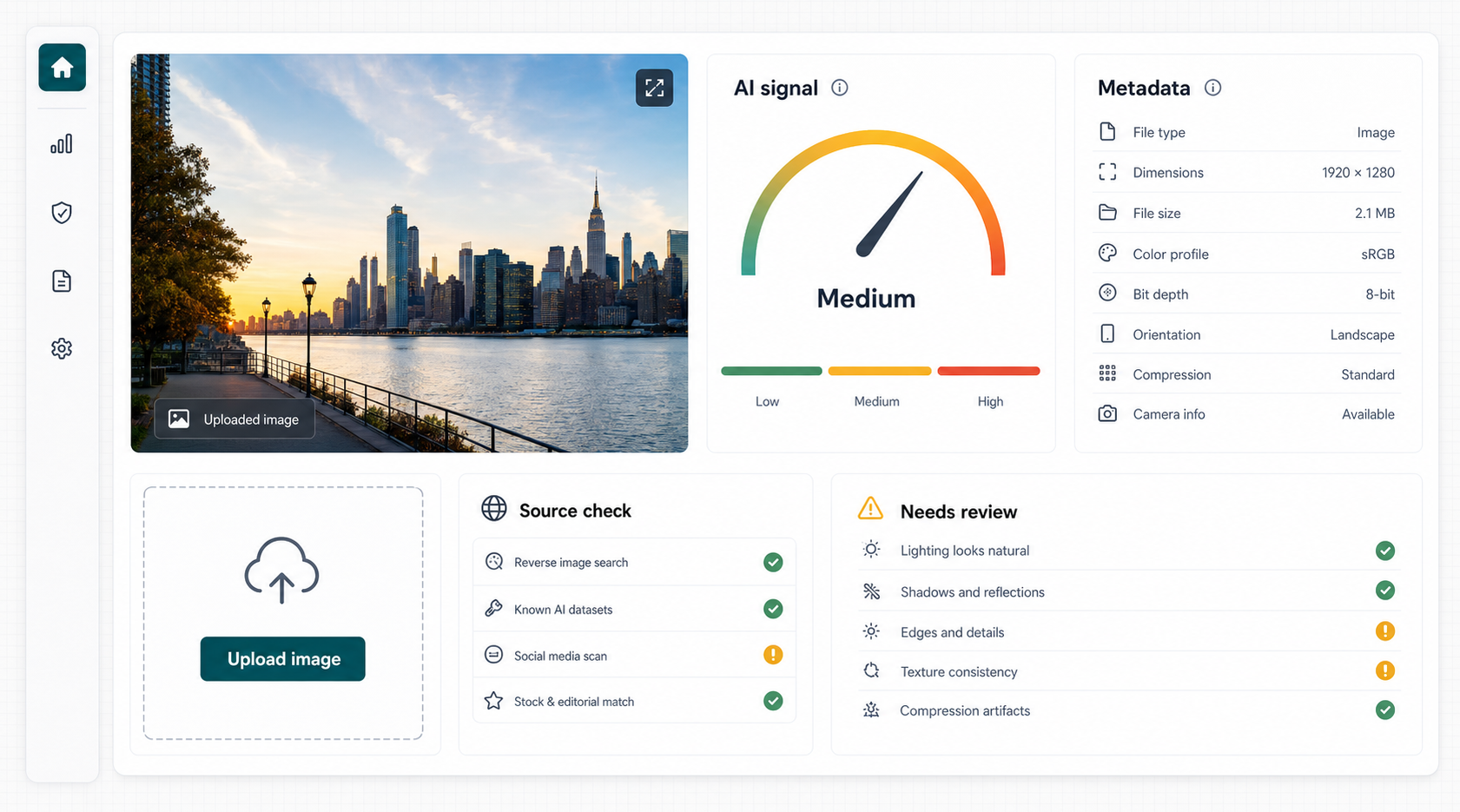
Upload a JPG, PNG, or WebP image to screen for AI-generation signals, file details, and plain-language review notes. Use the result as a lead, then verify the source and context.
AI signal
File clues
Review notes
No permanent image storage
Metadata review included
Probabilistic result
Live check
Upload an image
Temporary processing only
JPG, PNG, WebP
Up to 10MB
3 checks per day
No proof claims
No file selected
Result
Needs review
--
- Confidence
- -
- Provider
- -
- Dimensions
- -
- Type
- -
- File size
- -
- Software
- -
- Camera
- -
- Daily remaining
- -
High AI signalReview the source, creation trail, and whether the image has been edited.
Low AI signalStill check context. Real images can be manipulated, cropped, or mislabeled.
Missing metadataCommon on social platforms and messaging apps; useful, but not conclusive.
Review workflow
What happens during a check
The MVP keeps the workflow narrow on purpose: upload, inspect, score, then decide what to verify next.
Upload the cleanest file
Original files usually preserve more useful metadata than screenshots, reposts, or compressed downloads.
Review AI and file signals
The checker combines a provider signal with visible file details such as type, size, dimensions, and software clues.
Verify outside the score
Compare the result with source links, captions, publication date, account history, and other versions of the image.
What this AI image checker does
Image AI Checker is a first-pass screening tool. It checks an uploaded image for AI-generated signals and basic metadata clues, then returns a simple result that should be reviewed with the image source and context.
AI detection scores are provided using Sightengine technology. Image AI Checker adds upload validation, metadata review, account credits, and result presentation around that provider signal.
The result is not proof. AI image detection can be wrong, and metadata can be missing, edited, or stripped by normal apps and social platforms.
The most useful question is not simply whether the score is high or low. Ask whether the result agrees with what you know about the file. An original camera photo with a traceable source deserves a different review from a small screenshot copied from an unknown account. The same score can therefore lead to different next steps.
Detection is probabilistic. Do not use one score as the sole basis for legal, employment, financial, safety, or public accusations.
Result interpretation
How to read an Image AI Checker result
Start with the AI signal, but read it as an estimate rather than a label. A stronger signal means the file contains patterns that the detector associates with generated imagery. It does not identify the model used, prove who created the picture, or establish that every part of the image was generated.
Next, compare the signal with the file details shown beside it. Dimensions, file type, software tags, and camera metadata can help explain where a file may have passed through. A named camera can support a review, but metadata is editable. A software tag may reflect ordinary color correction, exporting, or compression; it does not automatically mean the visual content was created by AI.
Finally, look beyond the uploaded file. Find the earliest available post, inspect the account that shared it, compare captions, and search for another copy from a credible source. If a decision carries real consequences, keep the checker result as one note in the review rather than the final answer.
Accuracy limits
Why AI image detector results can change
A detector examines the file it receives. Changes made before upload can alter the available visual and metadata clues.
Compression and screenshots
Messaging apps, social networks, and screenshots can resize the image, remove metadata, and soften pixel patterns. Whenever possible, check the original file and compare it with the reposted copy.
Editing and mixed workflows
A real photograph may be retouched with generative tools, while an AI-created image may be painted over or combined with camera content. A single whole-image score cannot describe every region separately.
New generators and unfamiliar images
Detection models are trained on known examples. New generation methods, unusual artwork, heavy filters, and very small files can produce uncertain or misleading signals.
Manual verification
Five checks to make after using the tool
The fastest useful review combines the Image AI Checker result with a short source and context check.
1. Find the earliest source
Look for the first known upload, not only the account that reposted it. Earlier versions may have a fuller caption, higher resolution, or clearer attribution.
2. Compare other copies
Use reverse image search or a visual search tool to locate older and larger copies. A search may reveal that a current claim is using a real image from an unrelated event.
3. Inspect visible details
Check text, reflections, repeated objects, edges, shadows, and perspective. Treat odd details as prompts for closer review, since ordinary photography and editing can also create artifacts.
4. Check the publisher
Review the account history, original caption, linked website, date, and whether independent sources report the same event. A credible publication trail matters more than a polished appearance.
5. Preserve uncertainty
If the evidence conflicts, describe the image as unverified. Do not turn a detector estimate into a factual accusation about a person, seller, photographer, or publication.
Related image checking pages
Use the page that matches your question. Each page points back to the same checker tool.
AI Image Detector
Screen photos, artwork, and social images for AI-generated signals.
Open pageAI Image Detection Guides
Learn how to review metadata, social images, product photos, and detector accuracy.
Open guidesAI Generated Image Checker
Use this when the main question is whether a picture was created by AI.
Open pageAI Image Checker FAQ
Can this prove an image is AI?
No. The result is a screening signal, not proof. Always review the image source, context, and other evidence.
Why is metadata missing?
Many apps and social platforms remove metadata. Missing metadata alone does not prove that an image is fake or AI-generated.
Are uploaded images stored?
The MVP is designed for temporary processing only. Do not upload private, confidential, legal, medical, or sensitive images.